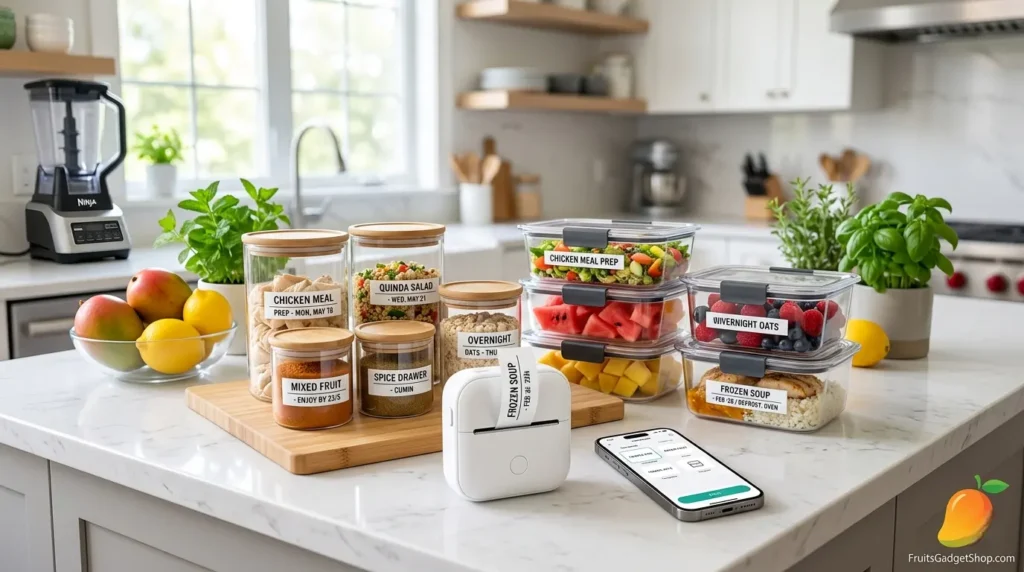
Turn your fridge, pantry, and containers into a clean, color-coded system — with one tiny wireless gadget that fits in your palm.
Meal prep without labels is just organized chaos. You open the fridge Monday morning, stare at four identical containers, and genuinely cannot remember which one is Tuesday’s lunch and which is last Thursday’s soup. A mini Bluetooth label maker solves this — and it makes your kitchen look like something straight out of a lifestyle magazine.
The smart kitchen organization trend has exploded in recent years, and at the center of it is one deceptively simple tool: the wireless Bluetooth label maker. These palm-sized devices connect to your phone, let you design labels in an app, and print them instantly — no tape, no ink cartridges, no messy label sheets. Just clean, professional-looking labels you can stick anywhere.
In this guide, we’ll show you exactly how to set one up, give you a full label system for meal prep, and walk through every container, drawer, and shelf where labels genuinely change the game. Let’s get organized.
What Is a Mini Bluetooth Label Maker — and Why Does It Belong in Your Kitchen?
A Bluetooth label maker is a compact, wireless printer that uses thermal printing technology — meaning it prints without ink or toner. Instead, heat activates the label tape to produce crisp, smudge-proof text and graphics. You design your label in a companion smartphone app, tap print, and the label slides out in seconds.
What makes them perfect for kitchen organization specifically comes down to four things:
- Speed: Print a label in under 10 seconds. During a meal prep session, you can label 20 containers in the time it used to take to write three with a marker.
- Consistency: Every label looks identical — same font, same size, same alignment. Your pantry finally matches the aesthetic you’ve been pinning for years.
- Durability: Thermal labels are water-resistant and stick firmly to plastic, glass, silicone, and metal — all the surfaces you find in a real kitchen.
- Templates: Most label maker apps come with pre-built templates for food labels, date labels, allergen warnings, and pantry categories, so you’re not designing from scratch every time.
Featured Product: Nelko P21 Mini Bluetooth Label Maker — Now $17.99
The star of this guide. The Nelko P21 connects wirelessly via Bluetooth, works with iOS and Android, and comes with tape included. Multiple pre-built templates make kitchen and meal prep labeling incredibly fast. Compact, rechargeable, and genuinely satisfying to use.
How to Set Up Your Mini Bluetooth Label Maker in 5 Minutes
One of the biggest misconceptions about Bluetooth label makers is that they’re complicated to set up. They’re not. Here’s the full setup process from box to first label:
- Charge the device. Most mini label makers like the Nelko P21 use USB-C charging. Plug it in for 30–60 minutes before first use to ensure a full battery. A full charge typically delivers 200–300 labels.
- Load the label tape. Open the back panel and slide the included tape cassette into the slot. The tape feeds through the guide rail and out the print slot at the top. It clicks into place — you’ll feel it lock.
- Download the companion app. Search your app store for the label maker’s official app (Nelko uses “Nelko” on both iOS and Android). Download it — it’s free and requires no account to start using.
- Pair via Bluetooth. Turn on the label maker by holding the power button for 2 seconds. Open the app, tap “Connect Device,” and select your label maker from the list. The connection takes about 5 seconds and stays paired automatically in future sessions.
- Choose a template and print your first label. In the app, navigate to Templates -> Kitchen/Food. Select a meal prep template, type your content (e.g., “Chicken & Rice — Mon, May 19”), and tap the print button. Your first label appears in about 8 seconds.
Pro Tip: Before your first meal prep session, print a full roll of date labels — seven labels with each day of the week. This saves time mid-prep and means you never scramble for a marker again. Use the “batch print” feature in the app to print multiples of the same label in one go.
The Complete Meal Prep Label System: What to Label and How
Having a label maker is one thing — having a system is what actually transforms your kitchen. Here’s a complete framework for labeling your entire meal prep setup, from fridge to freezer to pantry.
1. Food Storage Containers
This is the highest-impact use case. Every meal prep container should have at least three pieces of information: the dish name, the prep date, and the eat-by date. Most label makers let you create a template with all three fields that you just update each week.
For best results, pair your label maker with containers that have flat, smooth lids — labels stick better and peel off cleanly after use. The Rubbermaid Brilliance containers are a particularly strong match — their flat, transparent lids give labels a clean surface and look incredibly polished in the fridge.
Featured Product: Rubbermaid Brilliance Tritan Food Storage Containers (Set of 5) — $32.48
BPA-free, airtight, crystal-clear lids that pair perfectly with printed labels. Stackable, microwave-safe, and dishwasher-safe. The flat lid surface is ideal for label adhesion and easy peeling between uses. The best containers to complete your labeled meal prep system.
2. Pantry Jars and Dry Goods
Pantry organization is where aesthetic labeling really shines. Transfer your rice, oats, pasta, nuts, and spices into uniform jars, then print matching labels for each. A consistent font and label size across your entire pantry creates a visual system that’s immediately recognizable — you’ll never open the wrong jar again.
What to include on pantry labels: ingredient name, quantity per serving (optional), and an expiry/restock date. For spices, add a “bought” date so you know when they’re losing potency (most ground spices peak at 12–18 months).
3. Freezer Meal Labels
The freezer is where food goes to become unidentifiable. Frozen meals are notoriously hard to tell apart — and frost makes handwriting even harder to read. Printed labels solve this completely. Use a slightly larger font for freezer labels (14–16pt) since you’re often reading through frost or low light.
Freezer label must-haves: dish name, date frozen, portion count, and reheating instructions (e.g., “Microwave 4 min / Oven 350°F 20 min”). The Nelko P21 app lets you fit all of this on a single 15mm tape label.
4. Herb and Produce Freshness Labels
Fresh herbs, cut produce, and prepped vegetables stored in containers are easy to forget. A simple label with the item name and wash/prep date keeps your produce rotation visible. Combine this with reusable fruit and veggie savers to extend shelf life significantly while keeping everything labeled and organized.
Featured Product: Winb Reusable Fruit & Veggie Savers (Set of 4) — $9.99
Silicone stretch covers designed to keep cut avocados, tomatoes, apples, onions, and garlic fresh. The smooth exterior surface accepts label tape perfectly. Pair with your Bluetooth label maker to create a labeled freshness system for cut produce in your fridge.
20 Brilliant Label Ideas for a Beautifully Organized Kitchen
Need inspiration for what to label first? Here are the highest-impact areas organized by kitchen zone:
- Fridge Zones: Label shelves: “Grab & Go,” “This Week’s Meals,” “Leftovers,” “Drinks”
- Breakfast Prep: Overnight oats, pre-portioned granola, smoothie packs with blend instructions
- Lunch Containers: Name, date, and calories — great for families where each person has their own container
- Fresh Herbs: Label the jar with herb name + date cut. Store upright in water like flowers
- Spice Drawer: Top-of-lid labels mean you can read spices looking down without pulling each out
- Citrus Prep: Label pre-squeezed lemon/lime juice with date and volume — saves time mid-recipe
- Freezer Batches: Sauce batches, broth, soups: name, date frozen, and defrost instructions
- Salad Kits: Pre-bagged salad ingredients with “best by” and dressing pairing notes
Aesthetic Tip: Choose one tape color for each kitchen zone — white for fridge, clear for pantry, kraft/brown for freezer. This color-coding system lets you scan your kitchen at a glance and immediately know which zone a container belongs to.
Label Your Fruit Prep Station Too: Making Healthy Snacking Effortless
A labeled fruit prep station is one of the most underrated kitchen upgrades for healthy eating. When fruit is already cut, portioned, and labeled with a “ready by” date in the fridge, you and your family grab it instinctively — no prep friction, no excuse not to eat well.
The key is combining your label maker with the right prep tools. Pre-cut your watermelon, prep your strawberries, and slice your mangoes on Sunday — then label each container with the fruit, prep date, and a fun note or “Enjoy By” date. It makes the fridge look incredible and keeps healthy options front and center.
Featured Product: Fullstar 4-in-1 Pro Chopper & Spiralizer — $26.99
Chop, dice, slice, and spiralize fruit and vegetables in seconds — then label and store everything with your Bluetooth label maker. This combo of fast prep + clear labeling is the foundation of a genuinely sustainable meal prep habit. Includes a container to catch everything as you chop.
For citrus prep, having pre-squeezed juice stored in labeled bottles is a game-changer. Print a label that reads “Fresh Lemon Juice — Squeezed [date] — Use within 4 days” and you’ve turned a perishable into a reliable, ready-to-use ingredient every time you cook.
Featured Product: Zulay Kitchen 2-in-1 Metal Lemon Squeezer — $16.99
A sturdy max-extraction hand juicer that gets every last drop from lemons and limes. Squeeze a batch at the start of the week, pour into a labeled bottle, and you’ll have fresh citrus juice ready for every recipe, salad dressing, and drink for days.
Bluetooth Label Maker vs. Traditional Methods: Is It Worth It?
Still on the fence about investing in a label maker when markers and masking tape exist? Here’s an honest comparison:
- Bluetooth Label Maker: Fast (8 sec/label) | Looks professional | Water-resistant | Peel & reprint easily.
- Permanent Marker: ~30 sec prep | Looks vary | Water-resistant | Hard scrub to remove from lids.
- Masking Tape + Pen: ~45 sec prep | Looks messy | Not water-resistant | Leftover sticky residue.
- Pre-printed Sticker Pads: ~20 sec prep | Looks limited | Water resistance varies | Unchangeable fixed templates.
The verdict is clear: for anyone who meal preps more than once a week, a Bluetooth label maker pays for itself in time saved and frustration avoided within the first month.
Your Sunday Meal Prep + Labeling Workflow
Here’s a complete Sunday routine that integrates your label maker naturally into the prep process — not as an afterthought, but as a core part of the flow:
- Plan your week (10 min). Decide on 3–5 meals and which fruit/snacks you’ll prep. Write them down or use the notes app — this becomes your label content list.
- Pre-print all your labels (5 min). Before you start cooking, open the label maker app and batch-print labels for every dish you’re making. Include name, date prepped, and eat-by date. Stack them label-up on the counter.
- Prep and cook (60–90 min). Cook your meals, chop your produce, squeeze your citrus, and portion everything into containers as you go.
- Label as you seal (5 min). As each container gets its lid, apply the matching label. With pre-printed labels already done, this is just peel-and-stick — no delay, no wet hands typing on a phone.
- Organize into fridge zones (5 min). Stack labeled containers in their designated fridge zones. Your week is set — every meal visible, dated, and ready to grab.
Checklist:
- Label maker charged and loaded with tape
- Labels batch-printed before cooking starts
- All containers have name + date + eat-by info
- Freezer meals include reheating instructions
- Pantry jars updated if anything was refilled
- Produce and cut fruit labeled with prep dates
Frequently Asked Questions
Q: Do Bluetooth label maker labels survive the dishwasher? A: Standard thermal label tape is water-resistant but not dishwasher-proof. Labels are best applied to lids or areas that don’t go in the dishwasher. For containers that do get washed, simply peel the label before washing and reprint next time — it takes 8 seconds.
Q: What tape width is best for food containers? A: 12mm tape is ideal for most meal prep containers — wide enough to include name and date without overwhelming the lid. Use 6mm tape for spice jars and narrow containers. The Nelko P21 uses 12mm tape and most label maker apps let you choose the layout to fit perfectly.
Q: Can I print labels with custom fonts? A: Yes — most Bluetooth label maker apps support multiple fonts, borders, and custom icons. This is what makes the aesthetic labeling look so sharp. You can save custom templates so your style stays consistent every week without redesigning from scratch.
Q: How long does the label tape last? A: A single 8-meter tape roll typically yields 40–60 labels depending on label length. For weekly meal prep of 15–20 containers, one roll lasts about 2–3 weeks. Replacement rolls are widely available and inexpensive.
Q: Is a label maker only useful for the kitchen? A: Not at all — the same mini Bluetooth label maker works beautifully for home office organization, kids’ school supplies, garage storage bins, cable management, and travel packing. It’s one of those tools that, once you own it, you find uses for everywhere.
Ready to Organize Your Kitchen the Smart Way?
Browse our full collection of smart kitchen gadgets and accessories — everything you need for an aesthetic, organized meal prep setup.Shop Smart Kitchen Gadgets Here ->
Final Thoughts
A mini Bluetooth label maker is one of those rare kitchen tools that is simultaneously practical, affordable, and genuinely fun to use. The Nelko P21 in particular hits the sweet spot — wireless, app-connected, template-ready, and compact enough to keep on the counter without taking up space.
When you pair it with the right containers — like the Rubbermaid Brilliance set — and a proper labeling system, your entire kitchen transforms. Meal prep stops feeling like a Sunday chore and starts feeling like a productive, even satisfying ritual. You open your fridge Monday morning and everything is exactly where it should be, clearly labeled, and ready to go.
The best kitchen isn’t the biggest one — it’s the most organized one. And it starts with one small, wireless gadget and a roll of tape.
Explore more smart kitchen tools and accessories at FruitsGadgetShop.com — where every product is chosen to make your daily routines more fun, colorful, and convenient.